You are running targeted ads, your product pages look spectacular, and users are actively adding items to their carts. But when you look at your analytics, your revenue doesn’t match the traffic. Somewhere between the “Add to Cart” button and the final “Place Order” click, your customers are vanishing because of WooCommerce Checkout Optimization failure.
According to global e-commerce benchmarks, nearly 70% of digital shopping carts are abandoned. While some users are just window shopping, a massive percentage drop out due to hidden technical friction in the checkout pipeline.
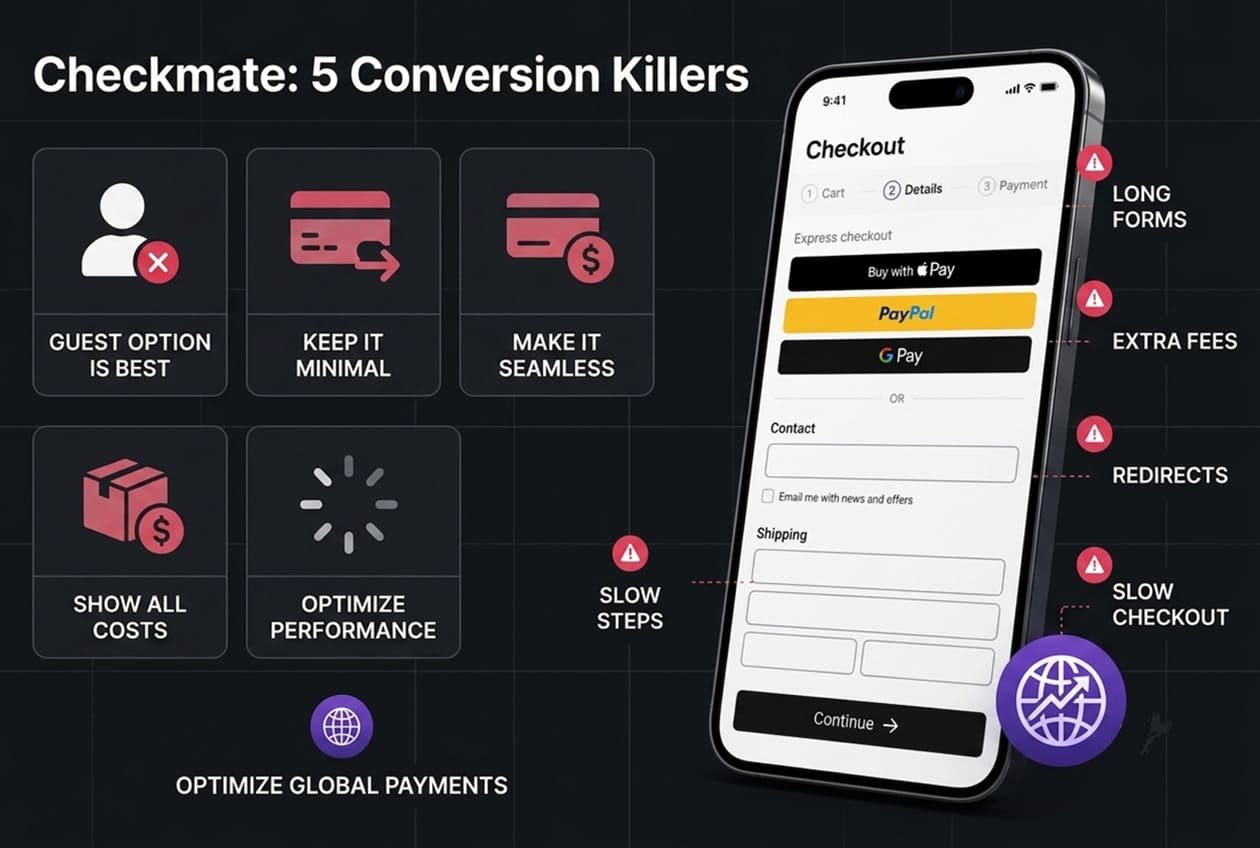
If your checkout process feels even slightly tedious, slow, or confusing on a mobile screen, buyers will close the tab. Let’s audit the 5 most common conversion killers in e-commerce checkouts and how to architect a frictionless, high-yielding transaction flow.
The Mandatory Account Creation Wall
Forcing a first-time buyer to create an account, verify their email, and invent a 12-character password before they can pay is the fastest way to kill a sale. It creates massive cognitive friction. Buyers want a seamless transaction, not a long-term commitment.
[ High Friction ]: Cart -> Force Register -> Verify Email -> Enter Password -> Pay (High Dropoff)
[ Low Friction  ]: Cart -> Guest Checkout + Single-Field Email -> Pay (High Conversion)

The Fix:
Enforce Guest Checkout: Make guest checkout the prominent, default option.

Post-Purchase Registration: If you want them to create an account for loyalty tracking, ask them after the payment is secure on the "Thank You" page with a simple "Save your details for next time" checkbox.
Bloated, Multi-Step Checkout Forms
Every single form field you add to your checkout page directly lowers your conversion rate. If your checkout requires separate fields for First Name, Last Name, Company, Address Line 2, Region, and a mandatory Phone Number, it becomes an exhausting chore—especially on mobile keyboards.
The Fix:
- Consolidate Fields: Use single-line fields for names (e.g., “Full Name” instead of splitting first and last) and integrate an address autocomplete API (like Google Maps Places API). This allows buyers to type three letters of their address and click to autofill the rest instantly.
- Match Billing to Shipping: Always check the “Billing address is the same as shipping” box by default to hide an entire block of secondary fields from view.
Fragmented, Slow Payment Gateways (The External Redirect)
If a user clicks “Pay Now” and your site redirects them away to an external, poorly designed third-party portal to enter their card info, you break their trust. Every second spent waiting for an external page to redirect and load is a second where the buyer might change their mind.
The Fix:
- In-Context Payment Processing: Utilize modern API integrations like Stripe inline elements or Shopify Elements directly on your domain. The fields should feel completely native to your theme layout.
- Leverage Digital Wallets: Enable Express Checkout buttons (Apple Pay, Google Pay, PayPal One-Touch) right at the top of the page. On mobile, this cuts the entire checkout time down from three minutes to a simple thumbprint scan.
Hidden Shipping Costs and Surprise Taxes at the Final Step
Nothing makes a buyer abandon a cart faster than seeing an item for $50, clicking through three pages of forms, and suddenly discovering an extra $15 shipping charge and $5 handling tax added at the very last second.
The Fix:
- Absolute Transparency: Display shipping rules or calculators clearly on the product page or within the slide-out mini-cart.
- Dynamic AJAX Calculators: Use dynamic background processing to calculate taxes and local shipping fees the exact moment they enter their ZIP/Postal code, updating the total transparently without reloading the entire page.
Sluggish Server-Side Execution (The Loading Spinner of Death)
When a customer finally clicks the “Place Order” button, your WordPress database has to simultaneously talk to your payment gateway, create an order record, calculate inventory levels, trigger automated customer emails, and clear the session cache.
If your server infrastructure is weak, that loading spinner will spin for 5 to 10 seconds. To a customer, a frozen checkout screen looks like a broken site or a credit card security risk. They will click “back” or double-click the button, resulting in duplicate charges and massive customer service headaches.
The Fix:
- Implement Object Caching (Redis/Memcached): Ensure your server utilizes advanced database object caching so high-frequency transaction queries process in milliseconds.
- Decouple Post-Purchase Triggers: Use background cron routines to handle heavy automation (like sending admin notifications or syncing external CRM data) after the customer’s payment confirmation screen has already loaded successfully.
Is Your WooCommerce Checkout Optimization Costing You Sales?
A beautiful product catalog means nothing if your WooCommerce Checkout Optimization funnel is leaking revenue, if the . Optimizing your e-commerce architecture requires deep, technical refinement of your server settings, database queries, and frontend design.
Explore our Premium E-Commerce Architecture Services to eliminate checkout friction, integrate advanced payment ecosystems, and engineer a high-performing retail experience designed to scale your business growth.